
Rehearsing with Loops
I recently rehearsed a 6th-grade honor band and took the opportunity to try a technique usually used in individual practice: looping. Loops are short digital audio or MIDI files that play on repeat without stopping or losing the beat. With most loop-based apps, the user simply cues the next loop and the transition happens automatically and seamlessly.
Because loops are quantized, musicians can also use them in live performance, choosing which loops to trigger and when. In essence, performers can build a composition in real time, shaping the form on the spot (intro, verse, chorus, etc.).
I use loops constantly when practicing the drumset. The saying is true: “Repetition is the brain’s best teacher.” Some people grasp a musical idea after two repetitions; others need ten or a hundred. That’s the beauty of looping: every learner gets the repetitions they need at their own pace. What follows is a practical guide to preparing and rehearsing with loops in an ensemble setting.
Finding a Beat
Rehearsing with loops can be as simple as having students play or sing along with a solid drum groove. Look for a beat with a clear kick and snare pattern, something irresistible, something that makes students naturally nod their heads. When you find a good beat, find a few more. Collect three or four loops in different tempos: a slow one (75–90 BPM) and a faster one (140–160 BPM).
While apps let you change tempos, beats generally sound best at the tempo they were created for.
Apps for Beats and Loops
There are many loop- and beat-based apps available (and the list changes constantly), but here are a few dependable options:
iOS & Android
Launchpad (Novation)
DrumJam (Sonosaurus LLC)
Drum Loops and Metronome
Drum Beats
Loopsic
Web-Based
Launchpad Arcade (Novation)
Moises.ai
edu.BandLab.com
Desktop
Algoriddim djay Pro AI
GarageBand
Remixlive
Creating your own beats could easily become its own article, book, or course. But if you find a song with a strong groove, or a beat your students will recognize, you can use DJ apps or AI tools like Moises.ai to isolate just the drum track. This is especially useful when a song has a great beat but the lyrics or content aren’t appropriate for school.
The app I rely on most is Launchpad by Novation (Figure 1). It’s simple, intuitive, and it works with the Novation Launchpad controller. It is a free app to get started. To expand its functionality costs more.
If you want to loop your students’ actual music (not just beats), that takes a few extra steps. I have a video showing the process here https://sites.google.com/uni.edu/modernband
Rehearsing with Loops in Six Steps
Before you start, briefly explain the process to your students. A quick overview helps them understand why rehearsal will feel different from a typical run-through. After they’ve done it once, all you’ll need to say is, “Let’s loop it! It sounds like this…”
Step 1: Start the Beat
Begin slightly under tempo, especially if the passage is technically difficult. You can always speed it up later or create excitement by gradually increasing the tempo.
Step 2: Model the Passage
Play the passage for students on an instrument. The goal is to help students hear an internal model of how it should sound, what musicians often call “getting it in their ear.” Play it at least three times so students hear:
The musical idea
The length of the loop
Do this before telling students exactly where the passage is in the music. The goal is to get them listening first instead of looking at the notation right away. They’ll probably recognize the section, but they won’t yet know the precise start and end points of the loop.
Step 3: Define the Loop
After they’ve heard it, explain where the loop starts and ends. This uses a Do Then Explain approach and aligns with the sound-before-sight principle. Once you define the loop, demonstrate it again with the beat. For example, “I’m starting at measure 9 and before I hit measure 17, I go back to measure 9.”
Step 4: Invite Students to Join In
Tell students you will play the loop alone once. On the second loop, they are welcome to enter. They can enter quietly at first. As they gain confidence, they can play louder.
Very important:Students do not need to enter on the second loop. Or the third. Or the fourth. They can finger along, shadow-play, or simply listen until they feel ready. Some jump in immediately; others wait until several loops have gone by so they can “sneak in” once the sound is full.
Also important:Normalize mistakes. Everyone makes them at first. Repetition will reduce them, but it’s important that everyone knows the whole purpose of the activity is to get better, not just be better.
Step 5: Repeat… and Repeat… and Repeat
This is the heart of looping. In a traditional rehearsal, once students get it right once, we often move on. With loops, students repeat the passage continuously, allowing their brains the time and the repetitions needed to truly internalize the music.
What does the teacher do while students loop?
Change beats
Walk around and help students who appear to need help
Give silent cues (fingerings, slide positions)
Sit in with a section
Play a supportive line (electric bass, guitar, etc.)
Acknowledge student effort with non-verbal positivity
Cheer on students
Enjoy watching students take ownership of their learning
Step 6: Turn Off the Beat
Once students have internalized the passage, turn off the beat or fade it out, and let them continue looping on their own. You might even have a student create their own beat on the drum set.
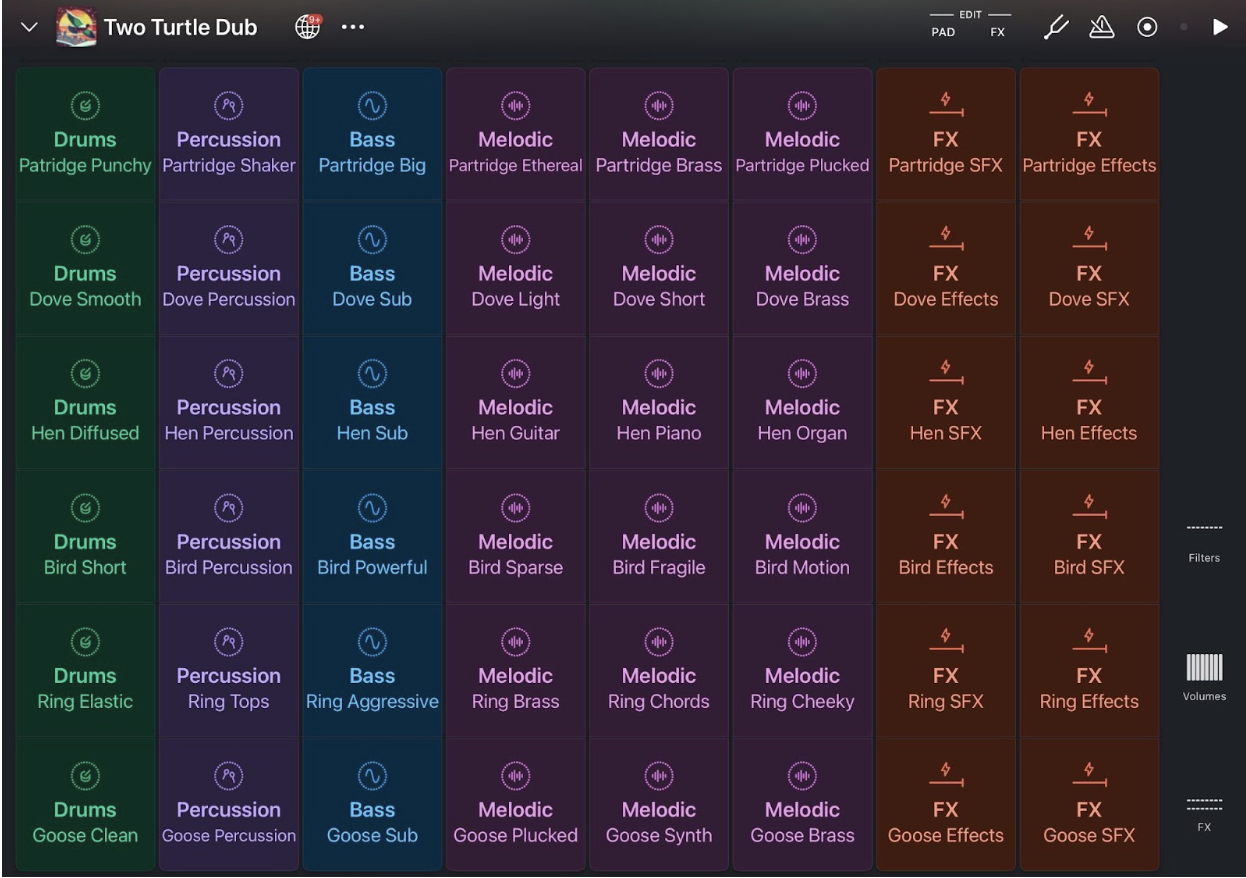
Figure 1. Launchpad by Novation
Figure 1. Screenshot of Launchpad app
What to say to students
Here’s an example of what you might say to your students when you’re getting ready to start looping.
“Alright, everyone, we’re going to try something a little different today. We’re going to rehearse using a loop. A loop is just a short musical section that repeats over and over without stopping. The goal is to give you lots of chances to hear the passage, try it, and improve every time it comes around.
Here’s how it will work:
First, I’ll start a beat so you can hear the groove.
Then I’ll play the passage for you a few times so you know what it sounds like.
After that, I’ll tell you exactly where the loop starts and ends.
Once the loop begins, you can jump in whenever you feel ready. Some of you will play right away, some will wait a loop or two, and that’s totally fine.
You don’t have to be perfect on the first try. The whole point is to get multiple repetitions so your brain and fingers can figure it out.
Your job is simple: listen, follow along, and join in when you’re comfortable. My job is to help quietly as you play. You’ll get lots of chances, so don’t stress about mistakes; they’re expected.”
Let’s give it a try. Here’s what it will sound like…”
Why It Works
The brain learns through repeated attempts. With looping, students get immediate second, third, fourth, and tenth chances right away, without interruption. Each repetition helps build or strengthen neural pathways needed for musical control. Some brains build these pathways quickly; others need more time. Looping gives every learner the space they need.
A Contrast: How Repetition Differs
Scenario A: Typical Rehearsal (Two Minutes)
Students rehearse a passage twice, separated by long stretches of teacher explanation, correction, and procedural reminders. The teacher diagnoses errors and tells students how to fix them. Students get limited trials and limited ownership.
Scenario B: Loop-Based Rehearsal (Two Minutes)
Students rehearse the same passage eight times.They decide when to enter, how to fix mistakes, and when they finally “get it.” The teacher supports quietly and efficiently with brief, non-verbal guidance. Mistakes decrease naturally as the repetitions accumulate.
Scenario B resembles how musicians practice independently: repeat until it clicks. And no, students won’t accidentally loop during a performance. The brain knows the difference between practice mode and performance mode.
Final Thoughts
Rehearsing with loops works for any ensemble: band, orchestra, choir, modern band, guitar class, and more. At its core, looping gives the brain real credit to be able to listen, adjust, and improve. This is the entire purpose of music education and education in general: helping students learn by giving them the time, opportunity, and space to do so. When students are allowed to repeat, revise, and take ownership of their learning, remarkable things happen.
Find a beat app, plug in your device, and let your students experience the power of repeated, student-driven practice.
They will love it, and so will you.
Links
Launchpad for iOS - Launchpad for iOS is a music-making app that allows users to trigger and combine short audio loops arranged in a grid. Each loop is time-aligned so multiple clips can play together without tempo or timing conflicts. Users can mix loops, mute or solo sections, and create basic arrangements by starting and stopping clips in real time. The app includes built-in effects and supports importing additional sounds, making it useful for simple beat-making, improvisation, and live performance practice.
Moises.ai - Moises.ai is an online and app-based audio tool that allows users to separate individual components of a song, such as vocals, drums, bass, and other instruments. It can also adjust tempo, key, and volume levels of each isolated track. The platform is commonly used by musicians and educators to create practice tracks, backing tracks, or simplified versions of songs. Users upload audio files or choose from available tracks, and the software processes the audio for editing and playback.
DrumJam app - DrumJam is a percussion-focused music app created by percussionist Pete Lockett in collaboration with Sonosaurus LLC. The app provides a large collection of recorded percussion sounds and loops, including drum set patterns and a variety of world percussion instruments. Users can layer loops, adjust their combinations, and experiment with creating rhythmic textures.
Algoriddim djay Pro - djay Pro is a digital DJ application available on mobile and desktop platforms. It provides tools for mixing audio tracks, adjusting tempo, adding basic effects, and transitioning between songs. The software includes features such as waveform displays, cue points, looping functions, and an Automix option that can create continuous playback without manual mixing. djay Pro can connect to music libraries from various sources, allowing users to work with playlists and tracks directly within the app.
